
Building a mobile app can feel exciting, overwhelming, and full of unknowns all at once. Whether you are a beginner, a small business owner, or a startup founder, understanding the Mobile app development process helps you move from a rough idea to a product people actually want to use.
A lot of apps fail not because the idea is bad, but because the process is rushed. Teams jump into coding too early, skip research, ignore user experience, or launch without proper testing. The result is usually the same: wasted time, wasted money, and disappointed users.
The good news is that app development becomes much easier when you break it into clear stages. In this guide, you will learn each phase of the Mobile app development process, what happens in every step, and how to avoid common mistakes along the way.
Why the Mobile App Development Process Matters
A structured process gives your app a stronger chance of success. Instead of guessing your way through development, you create a roadmap that keeps your team aligned and your budget under control.
Here is why the process matters:
-
It helps validate your idea before major investment
-
It improves communication between stakeholders, designers, and developers
-
It reduces the risk of expensive changes later
-
It leads to a better user experience
-
It makes launch and long-term growth more manageable
Think of it like building a house. You would not start with the roof. You begin with planning, a blueprint, and a solid foundation. App development works the same way.
Step 1: Define the App Idea and Validate the Market
Every successful app starts with a clear problem to solve. The first stage of the Mobile app development process is not coding. It is understanding what your app does, who it serves, and why people would use it.
Identify the Core Problem
Ask yourself:
-
What issue does this app solve?
-
Who is the target user?
-
Why would users choose this app over alternatives?
For example, a fitness app for busy professionals should focus on short workouts, simple tracking, and flexible scheduling. A feature-heavy approach may sound impressive, but it can make the app harder to use.
Research the Market
Before moving forward, study competitors and user behavior. Look at existing apps in your niche and find gaps you can fill.
Focus on:
-
Competitor strengths and weaknesses
-
User reviews in app stores
-
Common pain points
-
Pricing models
-
Popular features
This stage helps you avoid building something that already exists without improvement.
Define Your MVP
An MVP, or minimum viable product, includes only the essential features needed to solve the main problem. This is one of the smartest ways to manage cost and speed.
For example, a food delivery MVP might include:
-
User registration
-
Restaurant listings
-
Cart and checkout
-
Order tracking
-
Payment integration
It would not need loyalty rewards, advanced analytics, or AI recommendations on day one.
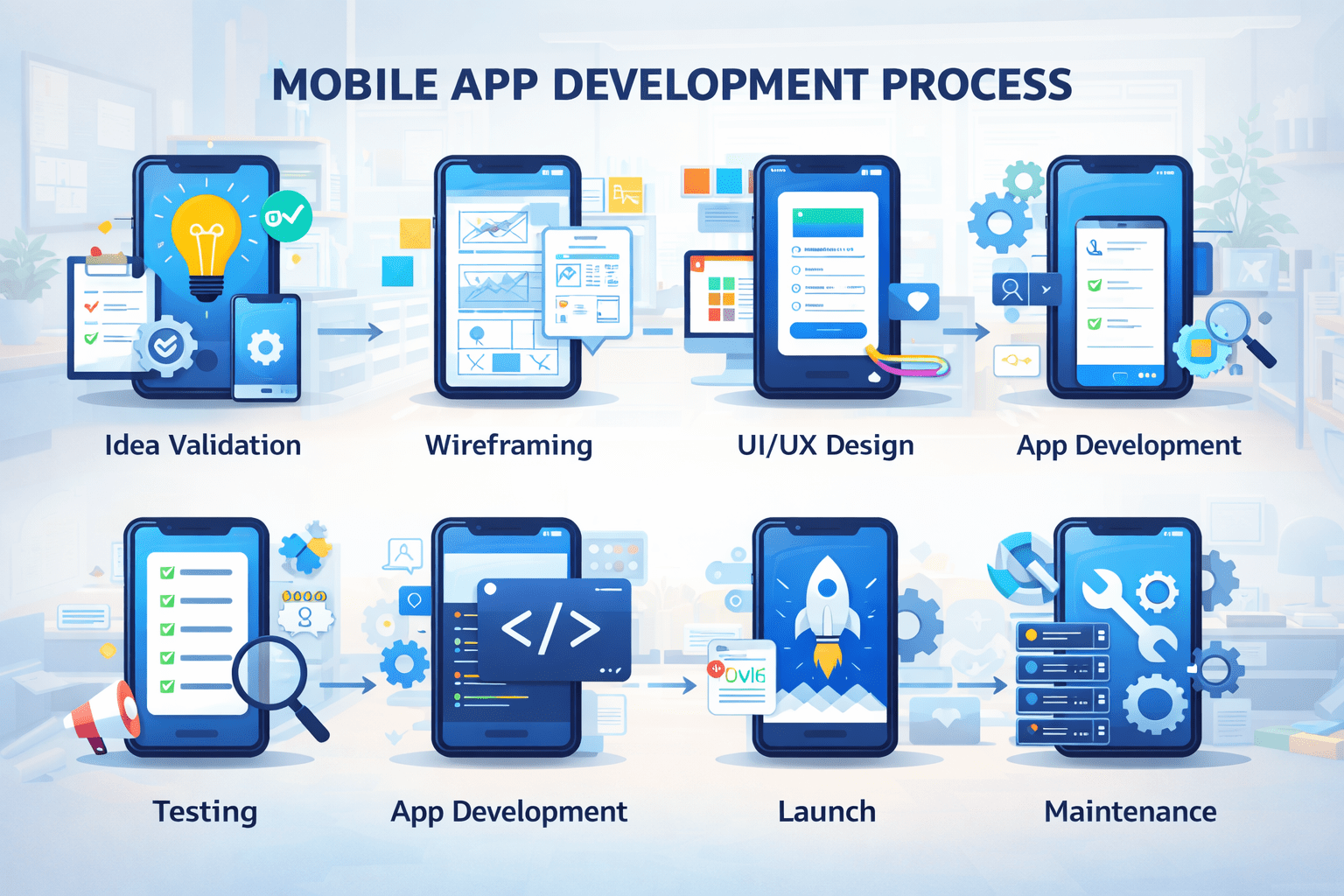
Step 2: Plan Features, Goals, and Requirements
Once the idea is validated, the next step in the Mobile app development process is planning. This is where you turn your concept into a practical execution strategy.
Start by outlining:
-
Business goals
-
User goals
-
Key app features
-
Functional requirements
-
Technical requirements
-
Budget and timeline
Create User Stories
User stories describe how real people will use the app. They keep development focused on actual needs rather than assumptions.
Examples:
-
As a user, I want to sign in with Google so I can register quickly
-
As a customer, I want to track my order in real time so I know when it will arrive
-
As an admin, I want to manage user accounts from a dashboard
These stories make it easier for designers and developers to understand priorities.
Choose the Right Platform
You also need to decide whether to build for:
-
iOS
-
Android
-
Both platforms
-
Cross-platform frameworks
This decision affects development time, budget, and performance expectations.
Step 3: Design the User Experience and Interface
Design plays a huge role in whether users stay or leave. A good-looking app is helpful, but a usable app is essential.
In this stage of the Mobile app development process, teams usually create wireframes, user flows, and UI mockups.
Wireframes and User Flow
Wireframes are simple layouts that show how each screen will work. They help map out the structure before visual design begins.
A user flow shows the journey from one action to another, such as:
Open app → Sign up → Browse products → Add to cart → Checkout
This helps identify friction points early.
UI Design
Once the structure is clear, the visual layer comes in. This includes:
-
Colors
-
Typography
-
Buttons
-
Icons
-
Spacing
-
Branding elements
A strong interface should feel intuitive, not confusing. Users should know where to tap, what to do next, and how to complete tasks without effort.
Prototype and Test Early
Before development starts, create a clickable prototype and get feedback from real users or stakeholders. This can reveal usability issues before you invest in coding.
For example, you may discover that users cannot find the checkout button easily, or that the onboarding flow feels too long.
Step 4: Choose the Development Approach
Now it is time to decide how the app will be built. This technical choice is a major part of the Mobile app development process.
Native Development
Native apps are built specifically for one platform, such as Swift for iOS or Kotlin for Android.
Benefits include:
-
Better performance
-
Stronger device integration
-
More polished user experience
The downside is usually higher cost when building for both platforms.
Cross-Platform Development
Frameworks like Flutter or React Native allow developers to write one codebase for multiple platforms.
Benefits include:
-
Faster development
-
Lower cost
-
Easier maintenance
This approach is often a good fit for startups and small businesses launching an MVP.
Step 5: Build the App
This is the phase most people think of first, but by now the groundwork has already been done. Development usually happens in small cycles or sprints.
The app is often divided into two main parts:
Frontend Development
This is everything the user sees and interacts with, such as screens, buttons, forms, and animations.
Backend Development
This handles the logic behind the scenes, including:
-
Databases
-
APIs
-
Authentication
-
Notifications
-
Server functionality
For example, when a user places an order in a shopping app, the frontend captures the action while the backend processes the payment, updates inventory, and sends confirmation.
Best Practices During Development
To keep the build process efficient:
-
Break work into milestones
-
Test features as they are built
-
Document important changes
-
Keep communication clear between teams
-
Prioritize core functionality first
Step 6: Test the App Thoroughly
Testing is one of the most important stages in the Mobile app development process. Even a great app idea can fail if users face crashes, bugs, or poor performance.
You should test for:
-
Functionality
-
Usability
-
Performance
-
Security
-
Device compatibility
Types of Testing
Functional testing checks whether features work as expected.
Usability testing shows how real users interact with the app.
Performance testing measures speed, responsiveness, and stability.
Security testing checks for vulnerabilities, especially if the app handles payments or personal data.
Compatibility testing ensures the app works across different screen sizes, operating systems, and devices.
A good example is a booking app that works perfectly on one phone but breaks on another because of screen layout issues. Testing prevents that kind of problem from reaching users.
Step 7: Launch the App
Once testing is complete, the app is ready for release. But launch is more than pressing publish.
To prepare for launch, you need:
-
App store assets
-
Screenshots
-
A strong app description
-
Keywords for discoverability
-
A privacy policy
-
Analytics tools
-
Crash reporting tools
This is also a great time to think about app store optimization. Your app title, visuals, and description should clearly communicate value.
Soft Launch vs Full Launch
Some businesses choose a soft launch in a limited market first. This helps gather feedback and fix issues before going wider.
A full launch works better when the product has already been tested and the marketing plan is ready.
Step 8: Maintain, Improve, and Scale
The Mobile app development process does not end after launch. In many ways, launch is just the beginning.
After release, monitor:
-
Downloads
-
Retention rate
-
Session length
-
User feedback
-
Crash reports
-
Conversion rates
Use this data to improve the app over time.
Post-Launch Improvements
Common updates include:
-
Bug fixes
-
Speed improvements
-
Feature enhancements
-
UX adjustments
-
Security patches
For example, if users consistently abandon onboarding after the second screen, that is a sign the process needs to be simplified.
Common Mistakes to Avoid
Many teams make avoidable mistakes during app development. Here are some of the biggest ones:
-
Building too many features too early
-
Skipping market validation
-
Ignoring user feedback
-
Underestimating testing
-
Choosing the wrong platform strategy
-
Launching without a marketing plan
A smart process keeps your app lean, useful, and adaptable.
Final Thoughts
The Mobile app development process is not just a technical journey. It is a business, design, and user experience journey too. When done right, it helps you create an app that solves a real problem, works smoothly, and has room to grow.
To recap, the process includes idea validation, planning, design, development, testing, launch, and ongoing improvement. Each step matters. Skipping one often creates bigger problems later.
Whether you are building your first app or preparing to scale a startup idea, taking a structured approach can save time, reduce risk, and increase your chances of success.
| FAQ Question | Answer |
|---|---|
| What is the mobile app development process? | The mobile app development process is the step-by-step journey of turning an app idea into a working mobile application. It usually includes idea validation, market research, planning, UI/UX design, development, testing, launch, and post-launch maintenance. |
| How long does the mobile app development process take? | The timeline depends on the app’s complexity, features, and platform requirements. A simple MVP can take a few weeks to a few months, while a more advanced app with custom features may take longer. |
| Why is planning important in app development? | Planning helps define the app’s goals, target audience, features, budget, and timeline. Without proper planning, businesses often face delays, cost overruns, and feature confusion during development. |
| What is an MVP in mobile app development? | An MVP, or Minimum Viable Product, is the first version of an app with only the core features needed to solve a user problem. It helps businesses launch faster, test the market, and improve the app based on real user feedback. |
| Should I build a native or cross-platform mobile app? | Native apps are built specifically for iOS or Android and usually offer high performance. Cross-platform apps use one codebase for multiple platforms, which can reduce cost and development time. The right choice depends on your budget, goals, and app requirements. |
| How much does it cost to develop a mobile app? | App development costs vary depending on features, design complexity, integrations, and the development approach. A basic app costs less than a feature-rich, enterprise-level mobile application. |
| Why is testing important in the mobile app development process? | Testing helps ensure the app works smoothly across devices and operating systems. It identifies bugs, improves usability, strengthens security, and creates a better user experience before launch. |
| What happens after the app is launched? | After launch, the app needs regular maintenance, performance monitoring, updates, bug fixes, and feature improvements. Post-launch support is essential for long-term success and user retention. |
Call to Action:
Ready to turn your app idea into a real product? Start by defining your MVP, understanding your users, and building with a clear process from day one.
| Section | Content |
|---|---|
| About Codeluminix IT Company | At Codeluminix IT Company, we understand that a successful mobile app is more than just code. It requires strategy, thoughtful design, seamless functionality, and continuous improvement. From idea validation and MVP planning to UI/UX design, development, testing, and post-launch support, Codeluminix helps businesses build mobile apps that are user-friendly, scalable, and aligned with business goals. |
| How Codeluminix Helps | Whether you are a startup building your first app or a growing business looking to expand your digital presence, Codeluminix IT Company can support you through every stage of the Mobile app development process. Our focus is on creating practical, high-performing mobile solutions that deliver real value to users and measurable results for businesses. |
| Why Choose Codeluminix? | End-to-end mobile app development support, user-focused design approach, scalable and modern app solutions, quality testing and performance optimization, and ongoing maintenance and improvement. |
| Call to Action | Ready to transform your app idea into a powerful digital product? Codeluminix IT Company is here to guide you through every step of the mobile app development process with the right strategy, technology, and support. |